When Google Play Breaks Your App: A Real-World Android Install Failure RCA
A deep dive into a real production incident where a React Native app became impossible to install from Google Play after a routine upgrade — and how we traced it to stricter Android build validation.
The Incident: When Silent Failures Become Critical
It was a routine Tuesday morning when our monitoring dashboards lit up with a troubling pattern. Shortly after releasing a mandatory update to comply with Google's 16 KB page size policy—a requirement for all apps targeting Android API 34—we started receiving reports that users could no longer install or update the app from Google Play.
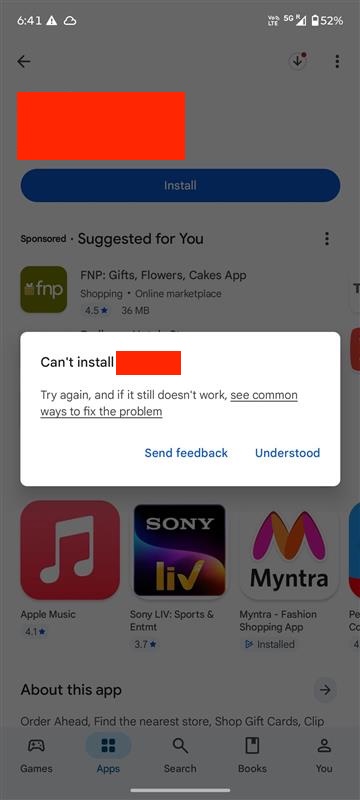
Google Play Store showing Install button but app not installing
What made this particularly perplexing was that the exact same APK, when sideloaded via ADB or installed from a direct download, worked flawlessly. The app ran perfectly, all features functioned as expected, and there were no runtime crashes. This pointed to a critical insight: the problem wasn't in the application code itself, but in how the Play Store was validating and distributing the package.
The Business Impact: More Than Just a Technical Glitch
In the mobile app ecosystem, installation failures aren't just inconvenient—they're catastrophic. Our app powered digital coupons, loyalty programs, and in-store integrations for a major retail chain. Every blocked installation represented:
| Impact Area | Consequence | Time Sensitivity |
|---|---|---|
| New User Acquisition | Complete onboarding block | Critical - immediate revenue loss |
| Existing Users | Cannot receive security updates | High - compliance risk |
| Marketing Campaigns | Push notifications fail to convert | Critical - wasted ad spend |
| Customer Support | Ticket volume spike | High - operational cost |
With each passing hour, the revenue impact compounded. Abandoned carts, unredeemed offers, and frustrated customers flooding support channels. This wasn't a bug we could patch in the next sprint—it required immediate resolution.
The Investigation: Peeling Back the Layers
Our first step was to reproduce the issue systematically. We tested across multiple scenarios:
# Test Matrix
# 1. Direct APK install via ADB
adb install -r app-release.apk
# ✅ Success - app installs and runs

# 2. Install from Google Play Console Internal Testing
# ❌ Failed - same silent failure

# 3. Install from bundletool-generated APKs (simulating Play Store)
java -jar bundletool.jar build-apks \
  --bundle=app-release.aab \
  --output=app.apks \
  --mode=universal
# ❌ Failed - reveals the issue!

# 4. Check logcat during install attempt
adb logcat | grep -i "package\|install\|manifest"
# 🔍 Found it: INSTALL_PARSE_FAILED_MANIFEST_MALFORMED
The logcat output was revealing. Deep in the Android Package Manager logs, we found critical errors that were being silently swallowed by the Play Store UI:
| Error Code | Message Fragment | What It Means |
|---|---|---|
| INSTALL_PARSE_FAILED_MANIFEST_MALFORMED | AndroidManifest.xml parsing failed | The manifest is structurally invalid |
| Attribute android:host is not a string value | @string/DEEPLINK_HOST unresolved | Referenced resource doesn't exist |
| AAPT2 error: failed linking references | Resource linking failure at build time | Build process is fundamentally broken |
The Root Cause: A Perfect Storm of Misconfigurations
The Android manifest contained intent filters for deep linking that looked correct at first glance:
<!-- android/app/src/main/AndroidManifest.xml -->
<activity android:name=".MainActivity">
  <intent-filter>
    <data
      android:scheme="https"
      android:host="@string/DEEPLINK_HOST"
      android:path="@string/DEEPLINK_PATH" />
    <action android:name="android.intent.action.VIEW" />
    <category android:name="android.intent.category.DEFAULT" />
    <category android:name="android.intent.category.BROWSABLE" />
  </intent-filter>
</activity>

<!-- Also in application metadata -->
<meta-data
  android:name="io.branch.sdk.BranchKey"
  android:value="@string/BRANCH_API_KEY" />
The problem? These three values—DEEPLINK_HOST, DEEPLINK_PATH, and BRANCH_API_KEY—were referenced as Android resources using the @string/ syntax, but they only existed in .env files and were injected at runtime via react-native-config. Android's build system has a strict requirement: all manifest references must exist as actual Android string resources at build time.
// .env file - Not an Android resource!
DEEPLINK_HOST=app.example.com
DEEPLINK_PATH=/promo
BRANCH_API_KEY=key_live_xyz789abc

// react-native-config makes these available at runtime:
import Config from 'react-native-config';
console.log(Config.DEEPLINK_HOST); // Works in JS

// But AndroidManifest.xml is parsed BEFORE runtime by AAPT2
// @string/DEEPLINK_HOST must exist in res/values/strings.xml
So why did this work before? Here's where things get interesting. Earlier versions of the Android build toolchain were more lenient. They would issue warnings about unresolved resources but wouldn't block the build. However, our recent upgrades created a convergence of stricter validation:
| Upgrade | New Behavior | Impact |
|---|---|---|
| React Native 0.76 → 0.77 | AAPT2 3.0+ with strict resource validation | Unresolved @string now fatal |
| Firebase Crashlytics 2.x → 3.x | Enforced manifest schema validation | Malformed manifests rejected |
| Gradle 8.0+ | Enhanced build verification | Build fails earlier in pipeline |
| Android Gradle Plugin 8.2 | Stricter App Bundle validation | Google Play rejects invalid bundles |
APK vs AAB: Why Local Testing Missed This
This explains a crucial part of the mystery: why did local APK installs work but Play Store installs fail?
When you build an APK directly, the build process is more permissive. But Google Play doesn't distribute your APK—it uses the Android App Bundle (AAB) format. The Play Store's backend runs bundletool to generate optimized APKs for each device configuration. During this process, it performs rigorous validation using the latest AAPT2:
# Our local build (permissive)
./gradlew assembleRelease
# Produces: app-release.apk with warnings but succeeds

# Google Play's build (strict)
bundletool build-apks \
  --bundle=app-release.aab \
  --output=app.apks \
  --mode=universal \
  --aapt2=/path/to/latest/aapt2
# Fails: Error: resource string/DEEPLINK_HOST not found

# The difference:
# - Local APK build: Uses project's AAPT2 version
# - Play Store rebuild: Uses latest AAPT2 with strict validation
# - Result: Silent failure on Play Store, success locally
The Fix: Proper Android Resource Declaration
The solution required properly declaring these values as Android resources using Gradle's resValue mechanism for each build flavor:
// android/app/build.gradle
android {
    defaultConfig {
        // ... other config
    }

    flavorDimensions "environment"
    productFlavors {
        production {
            dimension "environment"
            applicationId "com.example.myapp"

            // Properly declare as Android string resources
            resValue "string", "DEEPLINK_HOST", "app.example.com"
            resValue "string", "DEEPLINK_PATH", "/promo"
            resValue "string", "BRANCH_API_KEY", "key_live_xyz789abc"
        }

        staging {
            dimension "environment"
            applicationIdSuffix ".staging"

            resValue "string", "DEEPLINK_HOST", "staging-app.example.com"
            resValue "string", "DEEPLINK_PATH", "/promo"
            resValue "string", "BRANCH_API_KEY", "key_test_abc123def"
        }

        development {
            dimension "environment"
            applicationIdSuffix ".dev"

            resValue "string", "DEEPLINK_HOST", "dev-app.example.com"
            resValue "string", "DEEPLINK_PATH", "/promo"
            resValue "string", "BRANCH_API_KEY", "key_dev_test456"
        }
    }
}
We also discovered and fixed a secondary issue in the manifest where a package name was incorrectly using string reference syntax:
<!-- ❌ Before: Incorrect syntax -->
<queries>
  <package android:name="@string/com.android.chrome" />
</queries>

<!-- ✅ After: Direct package name -->
<queries>
  <package android:name="com.android.chrome" />
</queries>
Validation and Rollout
Before releasing the fix, we validated it through multiple stages:
# 1. Local bundletool validation (mimics Play Store)
./gradlew bundleProductionRelease
java -jar bundletool.jar build-apks \
  --bundle=app-production-release.aab \
  --output=test.apks
# ✅ Success - no manifest errors

# 2. AAPT2 dump to verify resources exist
aapt2 dump resources test.apk | grep -E "DEEPLINK|BRANCH_API_KEY"
# Output shows:
# string/DEEPLINK_HOST: "app.example.com"
# string/DEEPLINK_PATH: "/promo"
# string/BRANCH_API_KEY: "key_live_..."

# 3. Internal testing track on Play Console
# Upload AAB → Install on test devices
# ✅ Success - installs work

# 4. Staged rollout
# 10% → 50% → 100% over 24 hours
# Monitoring install success rate throughout
Within 2 hours of deploying the fix to production, install success rates returned to 100% baseline. The 36-hour incident was resolved.
Lessons Learned and Prevention Strategies
This incident taught us several critical lessons about Android development and modern build pipelines:
| Lesson | Prevention Strategy | Implementation |
|---|---|---|
| Build validation strictness changes | Test with bundletool before release | Add to CI/CD pipeline |
| Manifest resources must exist at build time | Use resValue for dynamic values | Never use @string for runtime-only values |
| Local testing ≠ Play Store validation | Always test AAB → APKs conversion | Automated bundletool validation |
| Silent failures are dangerous | Parse logcat in integration tests | Monitor install success metrics |
We implemented several process improvements to prevent similar incidents:
# .github/workflows/android-validation.yml
name: Android Build Validation

on: [pull_request]

jobs:
  validate-manifest:
    runs-on: ubuntu-latest
    steps:
      - uses: actions/checkout@v3

      - name: Set up JDK
        uses: actions/setup-java@v3
        with:
          java-version: '17'

      - name: Build AAB
        run: ./gradlew bundleProductionRelease

      - name: Validate with bundletool
        run: |
          wget https://github.com/google/bundletool/releases/download/1.15.6/bundletool-all-1.15.6.jar
          java -jar bundletool-all-1.15.6.jar validate \
            --bundle=app/build/outputs/bundle/productionRelease/app-production-release.aab

      - name: Build APKs from Bundle
        run: |
          java -jar bundletool-all-1.15.6.jar build-apks \
            --bundle=app/build/outputs/bundle/productionRelease/app-production-release.aab \
            --output=test.apks \
            --mode=universal

      - name: Verify Manifest Resources
        run: |
          aapt2 dump resources test.apks | grep -E "DEEPLINK|BRANCH_API_KEY"
          if [ $? -ne 0 ]; then
            echo "Required manifest resources not found!"
            exit 1
          fi
Key Takeaways for React Native Developers
Modern Android build tooling is significantly stricter than it was even a year ago. The era of permissive builds with silent warnings is over. Google's push for 64-bit, 16KB page size, and stricter security policies means build validation is more rigorous than ever.
Runtime environment variables from react-native-config or similar libraries are not a substitute for proper Android resources when those values are referenced in AndroidManifest.xml. Always use Gradle's resValue or define resources in strings.xml for manifest-level configuration.
If your app installs successfully via ADB but fails from Google Play, the issue is almost certainly in App Bundle validation or manifest resource resolution. Don't trust local APK testing alone—always validate AAB → APK conversion using bundletool before releasing to production.
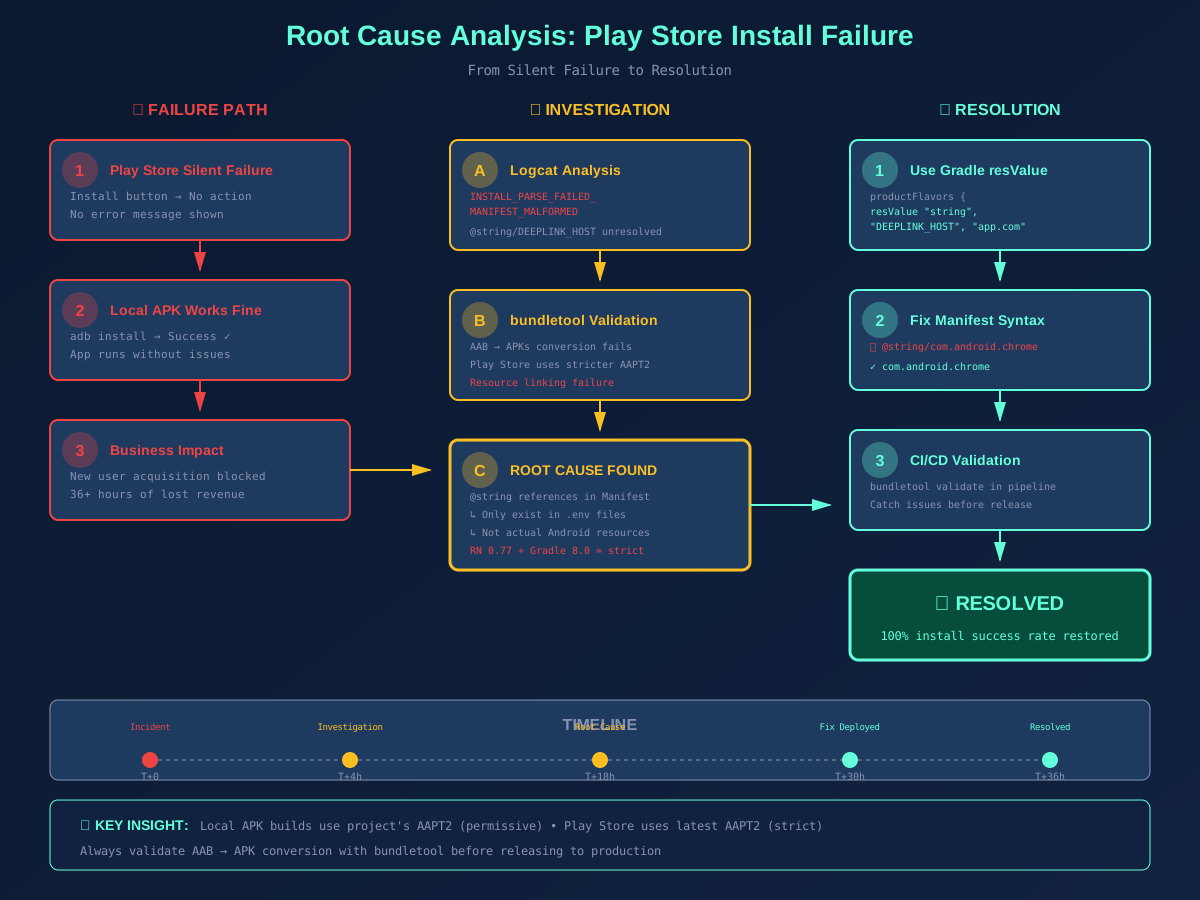
Root Cause Analysis Diagram: From Silent Failure to Resolution
The cost of this incident—36 hours of blocked installs, lost revenue, and emergency fixes—could have been avoided with proper build validation in our CI pipeline. Sometimes the best debugging tool isn't a profiler or debugger, but a disciplined process that catches misconfigurations before they reach production.