React 18 & 19: Concurrent Rendering, The Compiler, and Server Components
A deep dive into React 18's concurrent rendering, automatic batching, and transitions — plus React 19's game-changing compiler and Server Components, with practical examples and real-world guidance.
React 18 and 19 represent the two biggest evolutionary leaps the framework has made since hooks. React 18 shipped concurrent rendering — a fundamental change to how React schedules and executes work. React 19 goes further: an optimizing compiler that eliminates most manual memoization, and Server Components that blur the line between server and client rendering.
This post breaks down each feature practically: what it is, why it matters, and when to actually use it — including honest answers about what you no longer need to do.
React 18: Concurrent Rendering
What Is Concurrent Rendering?
Before React 18, rendering was synchronous and blocking. Once React started rendering a component tree, it ran to completion — nothing could interrupt it. This meant a heavy render could freeze the UI for hundreds of milliseconds, making the app feel sluggish.
Concurrent rendering changes this by making React's rendering interruptible. React can now start rendering, pause if something more urgent comes in (like a user keystroke), discard the in-progress work, and restart. No UI thread blocking. No jank.
| Legacy Rendering (React 17) | Concurrent Rendering (React 18) | |
|---|---|---|
| Rendering model | Synchronous, blocking | Interruptible, resumable |
| Can be paused? | No | Yes — React pauses for higher-priority work |
| UI responsiveness | Blocked during heavy renders | Always responsive |
| Multiple UI versions | Not possible | React can prepare multiple trees |
| Opt-in required? | N/A | Yes — must use createRoot |
Concurrent rendering is the foundation everything else in React 18 builds on. Features like Transitions and Suspense improvements only work because the renderer is now interruptible.
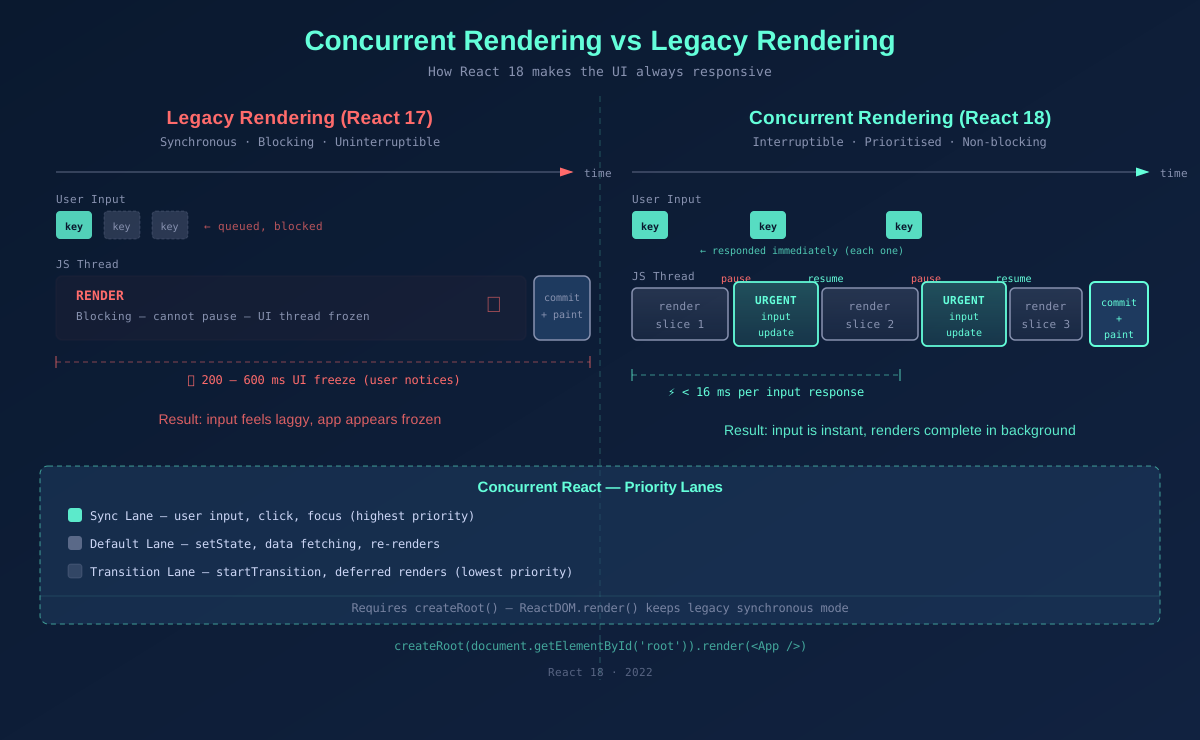
Concurrent Rendering vs Legacy Rendering — sync blocking render vs interruptible slices with priority lanes
How to Opt In
Concurrent rendering is opt-in via createRoot. If you stay on ReactDOM.render, you get legacy synchronous behaviour. Most apps should migrate — the API change is a one-liner.
// Before (React 17 — legacy, synchronous)
import ReactDOM from 'react-dom';
ReactDOM.render(<App />, document.getElementById('root'));

// After (React 18 — concurrent mode enabled)
import { createRoot } from 'react-dom/client';
const root = createRoot(document.getElementById('root')!);
root.render(<App />);

// That's it. All React 18 features now work.
// StrictMode double-invokes effects in dev to surface side-effect bugs —
// keep it on, it's intentional.
React 18: Automatic Batching
The Problem It Solves
Batching is React grouping multiple state updates into a single re-render. Before React 18, batching only happened inside React event handlers. Any setState calls inside setTimeout, Promises, or native event listeners triggered separate re-renders for each update — causing unnecessary work and potential UI flicker.
// React 17 behaviour
setTimeout(() => {
  setCount(c => c + 1); // triggers re-render
  setFlag(f => !f);     // triggers another re-render
  // 2 renders total — wasteful
}, 1000);

// Inside a React event handler (already batched in React 17)
function handleClick() {
  setCount(c => c + 1); // batched
  setFlag(f => !f);     // batched
  // 1 render total
}
How Automatic Batching Works in React 18
With React 18 and createRoot, ALL state updates are batched — regardless of where they originate. setTimeout, fetch callbacks, native addEventListener, custom event emitters — all batched automatically.
// React 18 — all of these now batch automatically

// Inside setTimeout
setTimeout(() => {
  setCount(c => c + 1);
  setFlag(f => !f);
  // 1 render total ✓
}, 1000);

// Inside a fetch callback
fetch('/api/data').then(() => {
  setData(result);
  setLoading(false);
  // 1 render total ✓
});

// If you explicitly need to opt out of batching (rare):
import { flushSync } from 'react-dom';

flushSync(() => setCount(c => c + 1)); // forces immediate re-render
flushSync(() => setFlag(f => !f));     // forces another immediate re-render
// Use flushSync sparingly — it's an escape hatch for libraries/integrations
For most apps, automatic batching is a silent performance win. You don't change any code — you just stop getting unnecessary re-renders for free.
React 18: Transitions and useTransition
Urgent vs Non-Urgent Updates
Not all state updates are equally important. Typing in an input field is urgent — the user expects instant feedback. Re-rendering a large list of results based on that input is non-urgent — a slight delay is acceptable. Before React 18, React treated both identically, which caused the urgent update to feel slow.
Transitions let you mark a state update as non-urgent. React will render the urgent update first (keeping the UI responsive), then process the transition in the background — interrupting it if a newer transition comes in.
import { useState, useTransition } from 'react';

function SearchPage() {
  const [query, setQuery] = useState('');
  const [results, setResults] = useState<Product[]>([]);
  const [isPending, startTransition] = useTransition();

  function handleSearch(e: React.ChangeEvent<HTMLInputElement>) {
    const value = e.target.value;

    // Urgent: update the input immediately
    setQuery(value);

    // Non-urgent: filter/render the results list
    startTransition(() => {
      const filtered = allProducts.filter(p =>
        p.name.toLowerCase().includes(value.toLowerCase())
      );
      setResults(filtered);
    });
  }

  return (
    <>
      <input value={query} onChange={handleSearch} placeholder="Search products..." />

      {/* Show a loading indicator while transition is pending */}
      {isPending && <span className="text-sm text-gray-400">Updating results...</span>}

      {/* This re-render is deferred — won't block the input */}
      <ProductList products={results} />
    </>
  );
}
startTransition vs useTransition
| API | Returns | When to use |
|---|---|---|
| useTransition() | [isPending, startTransition] | Inside components — gives you isPending to show loading UI |
| startTransition(fn) | void | Outside components (utils, event handlers without hooks) |
useDeferredValue — The Other Side
useTransition wraps the state setter. useDeferredValue wraps the value itself — useful when you receive a prop or value you don't control and want to defer expensive rendering based on it.
import { useDeferredValue, memo } from 'react';

function SearchResults({ query }: { query: string }) {
  // Defers re-rendering this component when query changes rapidly
  const deferredQuery = useDeferredValue(query);

  // isStale lets you visually indicate the results are outdated
  const isStale = query !== deferredQuery;

  return (
    <div style={{ opacity: isStale ? 0.6 : 1, transition: 'opacity 0.2s' }}>
      {/* Only re-renders when deferredQuery settles */}
      <ExpensiveList query={deferredQuery} />
    </div>
  );
}
React 19: The React Compiler
What Is It?
The React Compiler (previously known as React Forget) is a build-time optimizing compiler that automatically memoizes your components and hooks. It analyses your code, understands React's rules, and inserts the equivalent of React.memo, useMemo, and useCallback — without you writing any of it.
It works as a Babel plugin (and Vite/Rollup/webpack plugin). At build time, it transforms your components into optimized equivalents. At runtime, there are zero additional abstractions — no HOCs, no wrappers, just compiled JS.
// What you write
function ProductCard({ product, onAddToCart }) {
  return (
    <div onClick={() => onAddToCart(product.id)}>
      <h3>{product.name}</h3>
      <p>{product.price}</p>
    </div>
  );
}

// What the compiler effectively generates (conceptually)
const ProductCard = React.memo(function ProductCard({ product, onAddToCart }) {
  const handleClick = useCallback(
    () => onAddToCart(product.id),
    [onAddToCart, product.id]
  );
  return (
    <div onClick={handleClick}>
      <h3>{product.name}</h3>
      <p>{product.price}</p>
    </div>
  );
});
// You write the top, the compiler emits the bottom.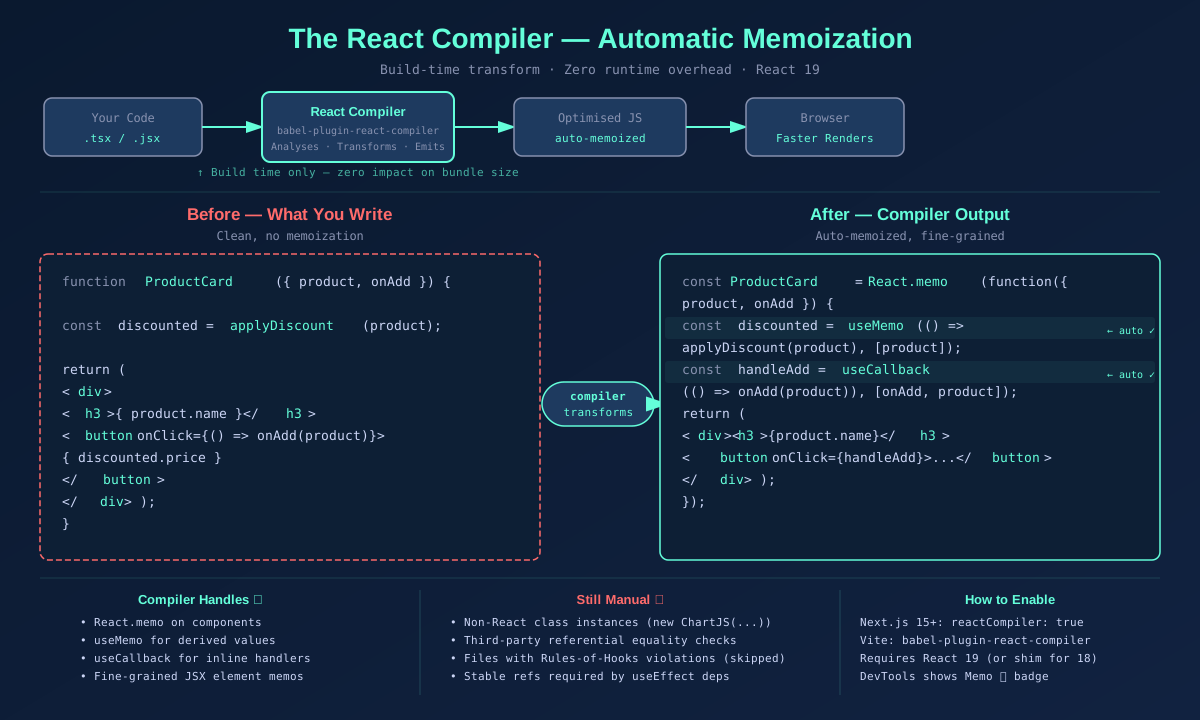
React Compiler build pipeline — before/after code transformation showing auto-memoization
How to Enable the React Compiler
The compiler ships as a Babel plugin: babel-plugin-react-compiler. It requires React 19 (or React 18 with the react-compiler-runtime shim for partial support).
# Install
npm install -D babel-plugin-react-compiler
npm install react-compiler-runtime # only needed if staying on React 18// babel.config.js
module.exports = {
plugins: [
['babel-plugin-react-compiler', {
// Optional: target a specific React version if on React 18
// runtimeModule: 'react-compiler-runtime',
// Optional: enable only for specific directories during migration
// sources: (filename) => filename.includes('src/components'),
}],
// ... other plugins
],
};// next.config.js (Next.js 15+ has first-class support)
/** @type {import('next').NextConfig} */
const nextConfig = {
experimental: {
reactCompiler: true,
},
};
module.exports = nextConfig;// vite.config.ts
import { defineConfig } from 'vite';
import react from '@vitejs/plugin-react';
export default defineConfig({
plugins: [
react({
babel: {
plugins: [['babel-plugin-react-compiler']],
},
}),
],
});Once enabled, you can verify it's working by installing the React DevTools browser extension — components optimized by the compiler show a 'Memo ✨' badge in the component tree.
Do You Still Need React.memo, useMemo, and useCallback?
Mostly no — the compiler handles the common cases automatically. But there are specific scenarios where manual memoization is still relevant or required.
| Scenario | Compiler handles it? | Manual memoization still needed? |
|---|---|---|
| Pure component re-render prevention | Yes ✓ | No — compiler auto-memoizes |
| Stable callback references for child components | Yes ✓ | No — compiler infers stable refs |
| Expensive inline calculations | Yes ✓ | No — compiler memoizes derived values |
| Non-React code (class instances, external libs) | No ✗ | Yes — useMemo for stable references |
| Dynamic keys or non-serializable deps | No ✗ | Yes — compiler can't reason about these |
| Referential equality for third-party comparators | Partial | Sometimes — e.g. react-table, virtualized lists |
| Code violating Rules of Hooks | Skipped ✗ | Yes — fix the violation first |
// Scenario 1: Compiler handles this — you can remove the manual memo
// BEFORE
const expensiveValue = useMemo(() => heavyComputation(data), [data]);

// AFTER (with compiler enabled) — just write it naturally
const expensiveValue = heavyComputation(data);
// Compiler detects it only depends on 'data' and memoizes automatically


// Scenario 2: Still use useMemo — non-React object with referential identity
// The compiler cannot predict when external class instances should be recreated
const chartConfig = useMemo(() => new ChartJS({
  type: 'line',
  data: chartData,
  options: { responsive: true },
}), [chartData]);


// Scenario 3: Still use useCallback — passing to a third-party component
// that does its own shouldComponentUpdate with referential equality checks
const onScroll = useCallback((event: ScrollEvent) => {
  virtualizer.handleScroll(event); // third-party virtualizer
}, [virtualizer]);


// Scenario 4: Code the compiler skips (Rules of Hooks violation)
// Fix the violation — don't add manual memos as a workaround
function BadComponent({ condition }) {
  if (condition) {
    const [state, setState] = useState(0); // ❌ hook in condition — compiler skips this file
  }
}
The practical guidance: enable the compiler, delete your existing React.memo/useMemo/useCallback, run your test suite. If something breaks, re-add the specific memoization for that case. In practice, most apps see a significant reduction in manual memoization with no behaviour change.
React 19: React Server Components
What Are They?
React Server Components (RSC) are components that render exclusively on the server. Their output — HTML and a serialized React tree — is streamed to the client. The component's code itself never ships to the browser. This is a fundamentally different model from both client-side rendering and traditional SSR.
| Client Components | Server Components | SSR (old) | |
|---|---|---|---|
| Renders on | Browser (client) | Server only | Server + browser |
| JS sent to client | Yes — full bundle | No — zero bytes | Yes — for hydration |
| Can use hooks? | Yes | No (no useState, useEffect) | Yes |
| Can access DB/FS? | No (only via API) | Yes — directly | Limited |
| Interactivity | Full | None | Full after hydration |
| File convention (Next.js) | 'use client' directive | Default (no directive) | getServerSideProps |
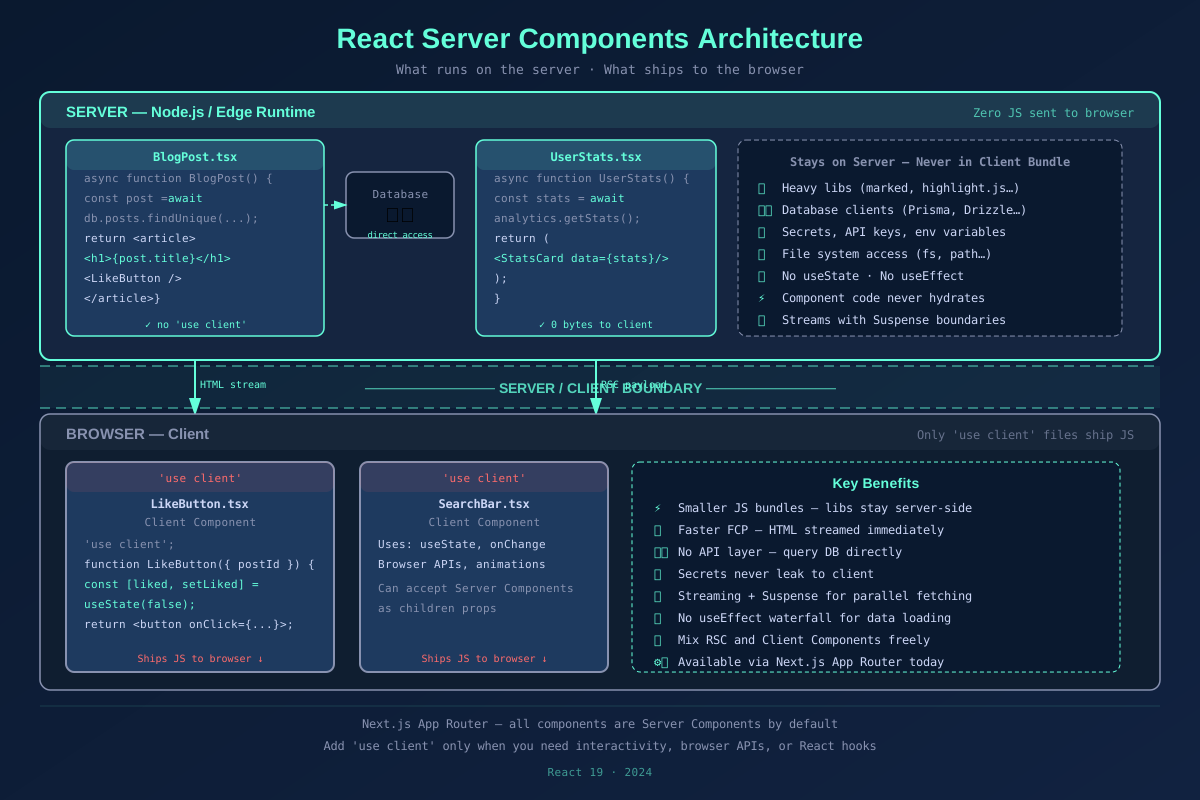
React Server Components architecture — server zone, client boundary, and client zone with component examples
The Core Benefit: Zero Bundle Cost
Any code in a Server Component — including its imports — is never sent to the client. A Server Component can import a 500kb markdown parser, a database client, or a full formatting library, and none of that appears in the client bundle.
// app/blog/[slug]/page.tsx — This is a Server Component by default in Next.js 15

// These imports stay on the server — zero cost to the client bundle
import { db } from '@/lib/database';           // DB client — server only
import { marked } from 'marked';               // 500kb parser — server only
import { highlight } from 'highlight.js';      // Code highlighting — server only

interface Props {
  params: { slug: string };
}

// No 'use client' = Server Component
// async/await works natively — no useEffect, no loading state
export default async function BlogPost({ params }: Props) {
  // Direct DB access — no API route needed
  const post = await db.posts.findUnique({
    where: { slug: params.slug },
  });

  if (!post) notFound();

  // Expensive processing — runs on server, result is streamed
  const html = marked(post.content);

  return (
    <article>
      <h1>{post.title}</h1>
      {/* dangerouslySetInnerHTML is fine here — content is trusted, server-rendered */}
      <div dangerouslySetInnerHTML={{ __html: html }} />

      {/* Client Component for interactivity — only this ships JS */}
      <LikeButton postId={post.id} initialLikes={post.likes} />
    </article>
  );
}
Client Components — The 'use client' Boundary
Not everything can be a Server Component. Anything that needs useState, useEffect, browser APIs, or event listeners must be a Client Component, marked with 'use client'. The directive marks a boundary — everything imported by a 'use client' file is also treated as a client component.
// components/LikeButton.tsx
'use client'; // This file and its imports run on the client

import { useState } from 'react';

interface Props {
  postId: string;
  initialLikes: number;
}

export function LikeButton({ postId, initialLikes }: Props) {
  const [likes, setLikes] = useState(initialLikes);
  const [liked, setLiked] = useState(false);

  async function handleLike() {
    if (liked) return;
    setLiked(true);
    setLikes(l => l + 1);

    // Optimistic update — call server action in background
    await fetch(`/api/posts/${postId}/like`, { method: 'POST' });
  }

  return (
    <button onClick={handleLike} disabled={liked}>
      {liked ? '❤️' : '🤍'} {likes} likes
    </button>
  );
}

// The parent BlogPost (Server Component) renders this.
// Only LikeButton's code ships to the client — not the DB client, not marked, not highlight.js
Data Fetching Without useEffect
One of the biggest ergonomic wins of RSC: you can fetch data directly with async/await at the top level of a component. No useEffect, no loading state boilerplate, no race conditions from unmount/remount cycles.
// Old pattern (Client Component) — lots of boilerplate
function UserProfile({ userId }: { userId: string }) {
  const [user, setUser] = useState<User | null>(null);
  const [loading, setLoading] = useState(true);
  const [error, setError] = useState<string | null>(null);

  useEffect(() => {
    let cancelled = false;
    fetch(`/api/users/${userId}`)
      .then(r => r.json())
      .then(data => { if (!cancelled) setUser(data); })
      .catch(e => { if (!cancelled) setError(e.message); })
      .finally(() => { if (!cancelled) setLoading(false); });
    return () => { cancelled = true; };
  }, [userId]);

  if (loading) return <Spinner />;
  if (error) return <ErrorMessage message={error} />;
  return <div>{user?.name}</div>;
}

// New pattern (Server Component) — clean, no boilerplate
async function UserProfile({ userId }: { userId: string }) {
  // Errors bubble to the nearest error.tsx boundary automatically
  const user = await db.users.findUnique({ where: { id: userId } });

  return <div>{user?.name}</div>;
}
// Suspense in the parent handles the loading state — one boundary, many components
Parallel Data Fetching with Suspense
Server Components compose naturally with Suspense. Multiple async components can fetch data in parallel, and Suspense boundaries handle the loading states declaratively — no useState juggling.
// app/dashboard/page.tsx
import { Suspense } from 'react';
import { UserStats } from './UserStats';       // async Server Component
import { RecentOrders } from './RecentOrders'; // async Server Component
import { Notifications } from './Notifications'; // async Server Component

export default function Dashboard() {
  return (
    <div className="grid grid-cols-3 gap-6">
      {/* All three fetch in parallel — each streams independently */}
      <Suspense fallback={<StatsSkeleton />}>
        <UserStats />
      </Suspense>

      <Suspense fallback={<OrdersSkeleton />}>
        <RecentOrders />
      </Suspense>

      <Suspense fallback={<NotificationsSkeleton />}>
        <Notifications />
      </Suspense>
    </div>
  );
}

// app/dashboard/UserStats.tsx
async function UserStats() {
  const stats = await db.analytics.getUserStats(); // runs in parallel with others
  return <StatsCard data={stats} />;
}
What Server Components Are Not
Server Components are not a replacement for SSR, and they're not the same as getServerSideProps. SSR runs client components on the server for the initial HTML and then re-hydrates them with JS. Server Components never hydrate — their code never runs on the client at all. They're complementary: Next.js uses both together.
| SSR (getServerSideProps) | React Server Components | |
|---|---|---|
| When introduced | Next.js 9 / React itself | React 19 / Next.js App Router |
| JS sent to client | Yes — hydration JS | No — zero JS |
| Can use hooks | Yes (after hydration) | No |
| Granularity | Page level | Component level |
| Streaming | No (blocking HTML) | Yes — streams per Suspense boundary |
| Direct DB access | In getServerSideProps only | In any server component |
How React 18 and 19 Fit Together
These features form a coherent system. Concurrent rendering makes React 18's scheduling work. Automatic batching reduces wasted renders. Transitions keep UIs responsive under load. The compiler eliminates memoization overhead. Server Components move data fetching and heavy processing to the server.
| Feature | Version | Main Benefit | Action Required |
|---|---|---|---|
| Concurrent Rendering | React 18 | Non-blocking UI, interruptible renders | Switch to createRoot |
| Automatic Batching | React 18 | Fewer re-renders, no code changes | None (works with createRoot) |
| useTransition | React 18 | Prioritise urgent vs deferred updates | Wrap non-urgent setState |
| React Compiler | React 19 | Auto-memoization, no manual memo | Add babel-plugin-react-compiler |
| Server Components | React 19 | Zero client JS, direct DB access | Use framework (Next.js App Router) |
Final Thoughts
React 18 solved the scheduling problem — making React capable of prioritising work the way browsers do. React 19 solves the optimisation problem — making React apps fast by default without requiring developers to manually wire up memoization at every callsite.
The practical takeaway: upgrade to React 18 first and swap to createRoot. Add useTransition anywhere you have slow state-driven renders. Then upgrade to React 19, enable the compiler, and remove most of your manual useMemo and useCallback. Finally, if you're on Next.js App Router, move data fetching into Server Components and watch your bundle sizes drop.
Each of these is a standalone improvement — you don't need all of them at once. But together they represent a React that is fundamentally faster, cleaner, and more ergonomic than what shipped in React 16 with hooks. The framework has grown up.